
Databricks Genie and SQL Expressions
Can Databricks Genie truly replace hours of manual SQL coding and testing with a simple conversational interface?
As with most things in IT, the answer is: it depends.
While Databricks Genie offers powerful natural language to SQL capabilities, the key to unlocking consistent, production-grade insights lies in how well your Databricks Genie space is configured. In this blog series, we explore essential techniques for configuring an effective Databricks Genie space to ensure it consistently delivers reliable, high-value insights to your users. We also examine how SQL Expressions in Databricks Genie play a critical role in producing accurate, governed, and business-aligned AI-generated SQL.
Understanding a Databricks Genie Space for Conversational Analytics
A Genie space is powered by data registered in Unity Catalog within Databricks. It leverages object metadata to generate SQL responses from natural language prompts.
However, the real magic happens when this is combined with the knowledge store – collection of configurable elements designed to fine-tune the AI’s logic. By optimising these settings, you can significantly improve the accuracy and relevance of the generated insights.
A Genie space can include up to 25 objects (tables, views, or metric views). Because of this limit, it is best practice to keep each Genie space focused on a specific business domain (e.g., Finance, HR, Sales) rather than attempting to create a universal analytics assistant.
Domain-specific Genie spaces improve:
- Query accuracy
- Performance
- Semantic clarity
- AI grounding
Optimising Databricks Genie with SQL Expressions
Today, we’ll explore the use of SQL Expressions. These allow you to pre-define business logic as filters, measures, or dimensions. By doing so, you can also provide common business synonyms to increase response accuracy.
Using SQL Expressions to offload logic is often an effective way to improve the tool’s performance. As a rule of thumb: if a verbose natural language instruction can be translated into a formula or a SQL statement, it should be.
Case Study: Implementing Databricks Genie for Booking Analytics
Wanderbricks Travel Agency is implementing a Databricks Genie space to allow users to query booking and hotel stay data using conversational analytics. Relevant tables were added to the Genie space and are ready to be explored.
Measures in Databricks Genie: Using SQL Expressions to Define “Net Bookings”
Users start by asking some simple questions such as ‘What are net booking by year and month?’
Genie response:
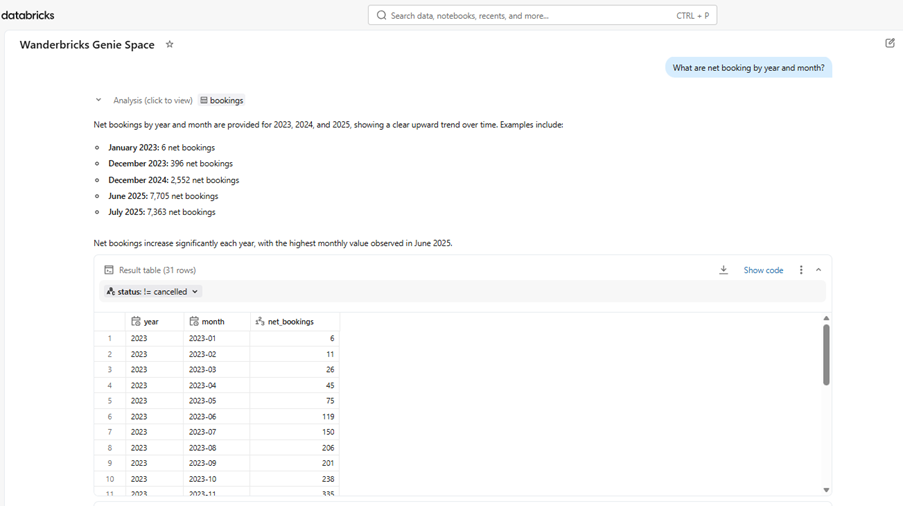
Genie AI gracefully deals with the query and creates SQL to get the answer:
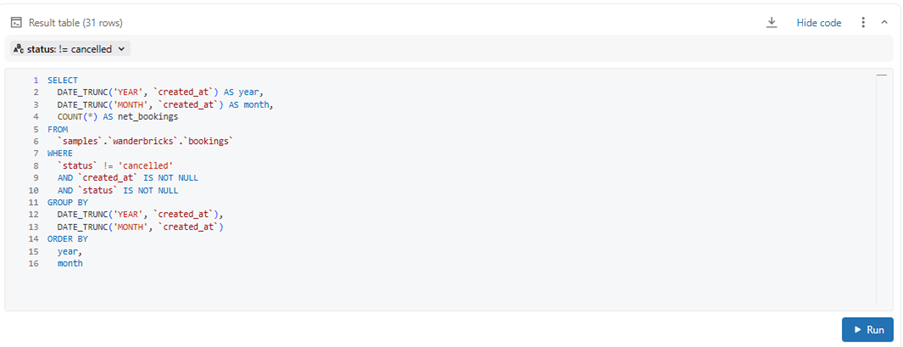
As we can see, it also makes best attempt at guessing the definition of ‘net bookings’ and excludes cancellations from bookings total.
Having explored our dataset we know that there are multiple booking statuses such as:
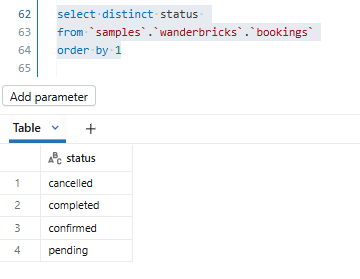
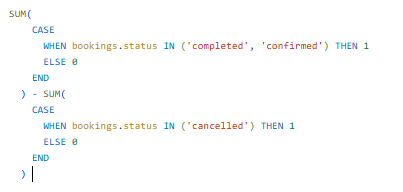
Requirement gathering sessions with business users has also informed us that ‘net bookings’ is defined as (total confirmed or completed bookings) – (total cancelled bookings). Genie has no access to this business logic yet – we will make it available by using SQL Expressions and adding a new measure ‘Net Bookings’:
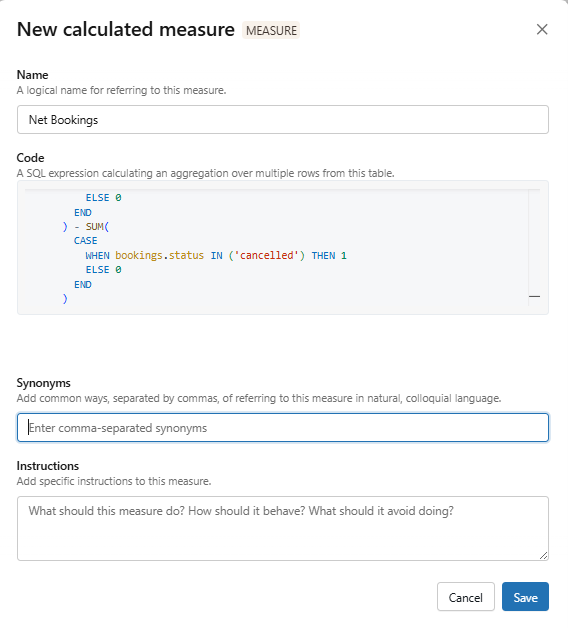
Full code:
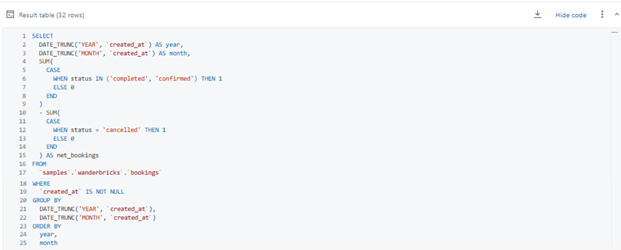
Now, when users ask the same question – What are net booking by year and month? – Genie AI uses this measure and creates correct SQL:
Similarly, other measures relevant to the business should be added to Genie space and refined as and when needed.
Using SQL Expression Filters in Databricks Genie
It is expected that business users will use abbreviations common in the business, such as ‘What are net bookings LY by month?’.
Genie response:
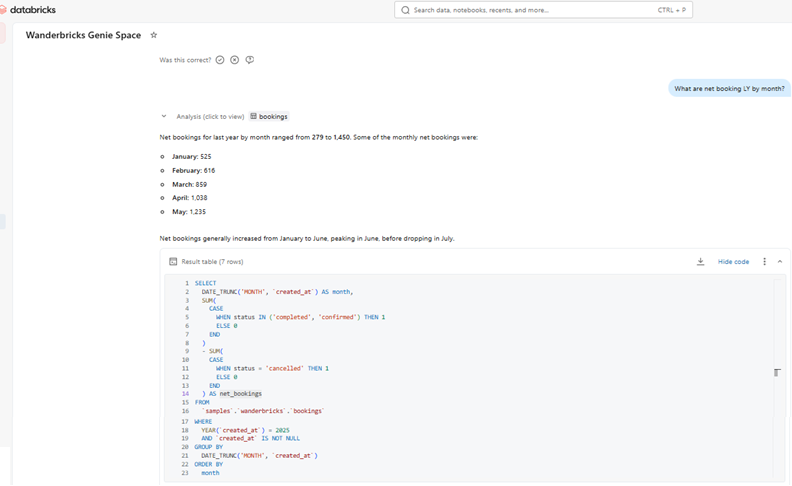
Here, Genie AI has corrently identified LY as ‘Last Year’ and used this logic in SQL code:
YEAR(`created_at`) = 2025
In this case, however, Genie AI is unaware that the user intends ‘LY’ to mean ‘last financial year.’ To clarify, the user rephrases the question to: ‘What are net bookings by month for the last financial year?’
Genie response:
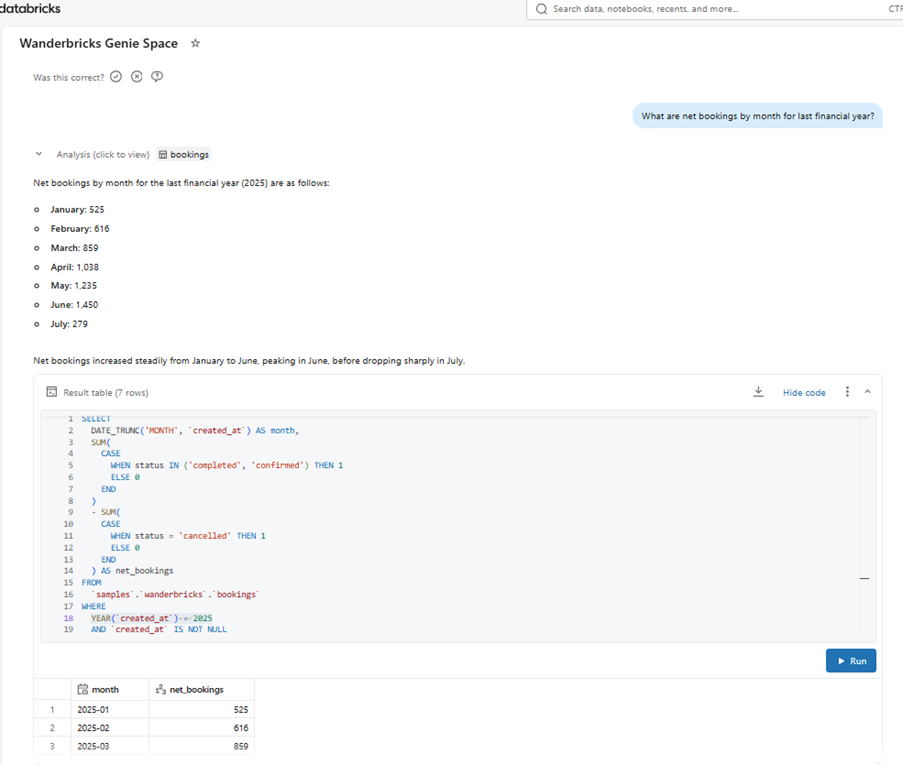
Genie currently aligns the financial year with the calendar year. Since Wanderbricks uses a different fiscal cycle, we will need to fine-tune the Genie space using the following SQL Expression filter:
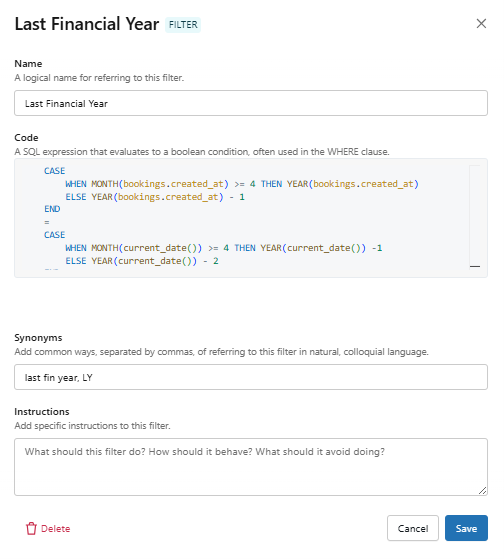
Code added:
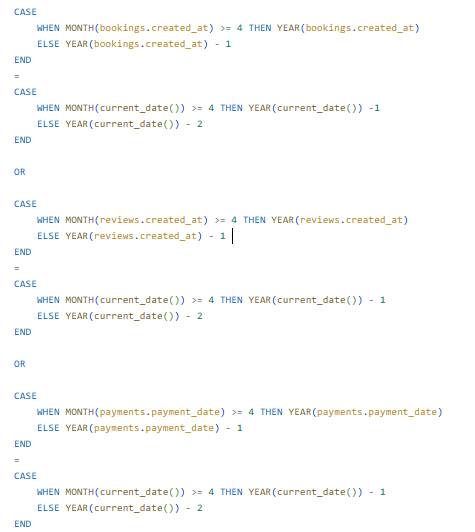
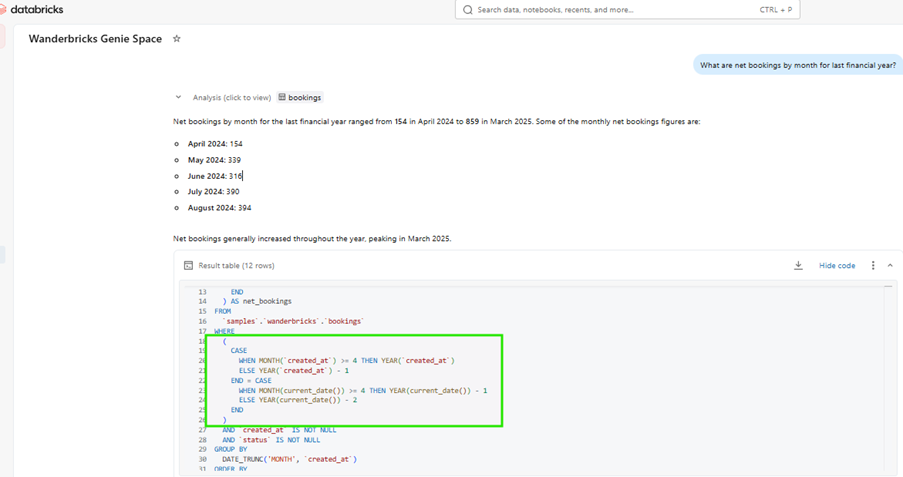
The Wanderbricks Genie space does not include a dedicated date table; however, by using the code above, we ensure that Genie AI correctly handles ‘Last Year’ (LY) questions related to bookings, payments, and reviews. We can also add business-specific synonyms, such as ‘last fin year’ or ‘LY’. Consequently, when the same question is asked, Genie will reference the newly added filter and generate the correct SQL code:
Creating Dimensions in Databricks Genie with SQL Expressions
SQL Expressions allow addition of new, derived dimensions and additional business logic. In our case, users might want to see data by financial year, quarter etc. As we don’t have a dedicated date table, we can use SQL Expressions to fill this gap and also implement any organisational logic around financial year etc.
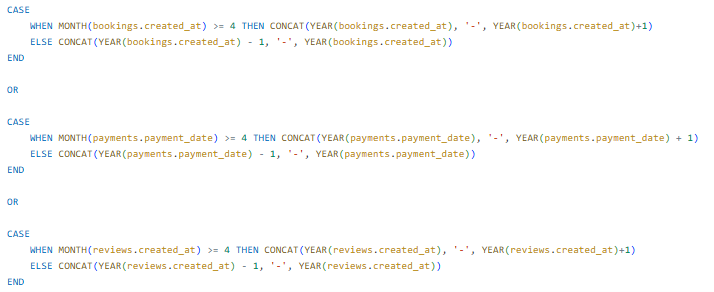
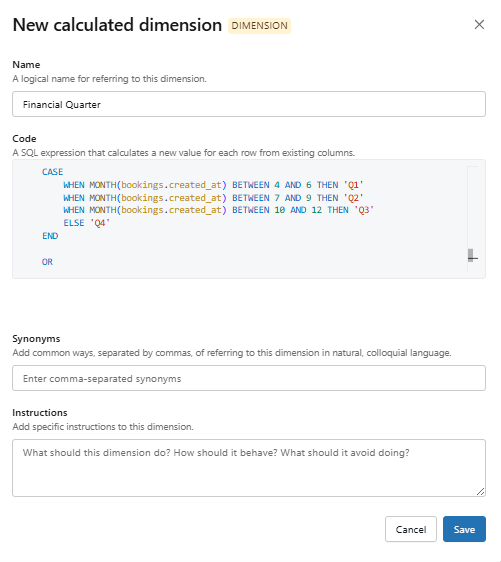
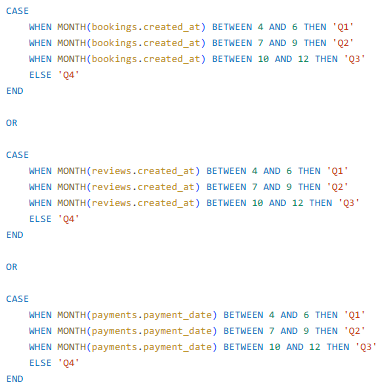
We create 2 dimensions: ‘Financial year’ and ‘Financial Quarter’ based on 3 tables – bookings, payments and reviews.
Financial Year dimension:
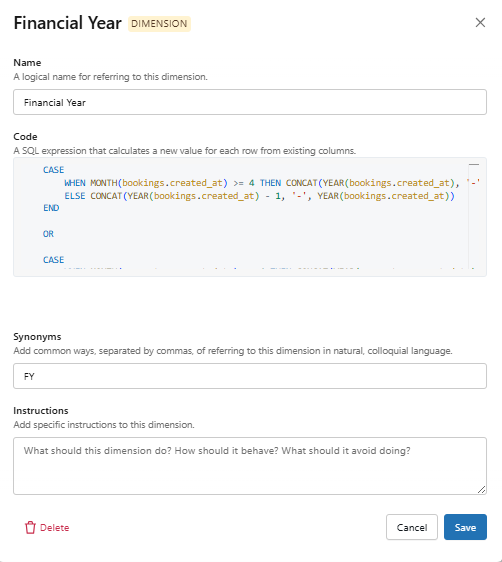
Full code:
Financial Quarter dimension:
Full code:
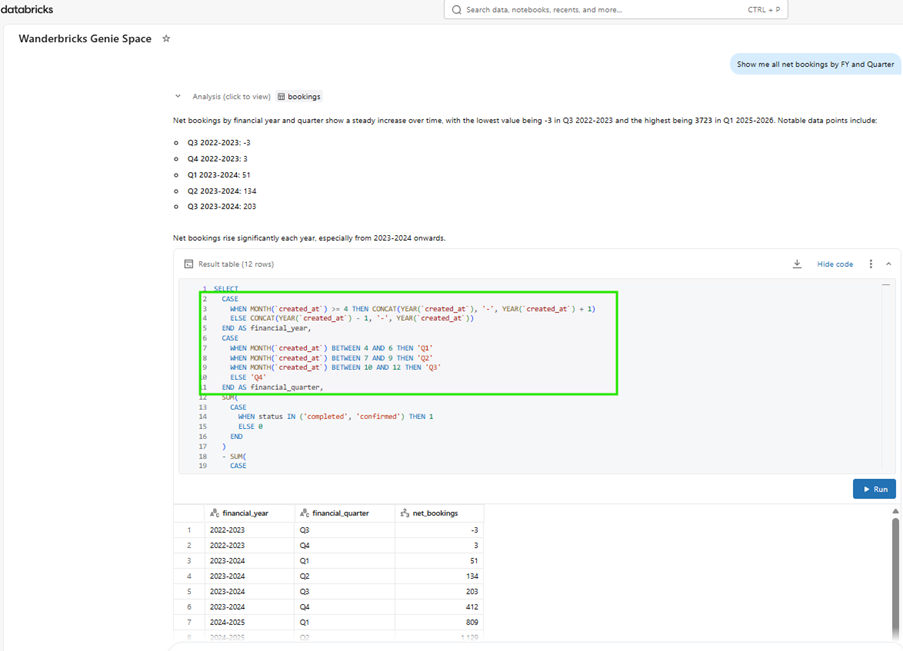
Now, when users ask questions related to fin year or quarter, Genie AI uses these newly created dimensions.
Question: ‘Show me all net bookings by FY and Quarter’
Genie AI response:
Dimensions can also be used to bridge knowledge gaps. For example, if users want to view net bookings for ‘Luxury’ properties, but that classification exists outside the current dataset, we can add ‘Property Category’ as a new dimension. This allows us to incorporate the reporting logic that bands properties into Luxury, Mid-range, or Budget.
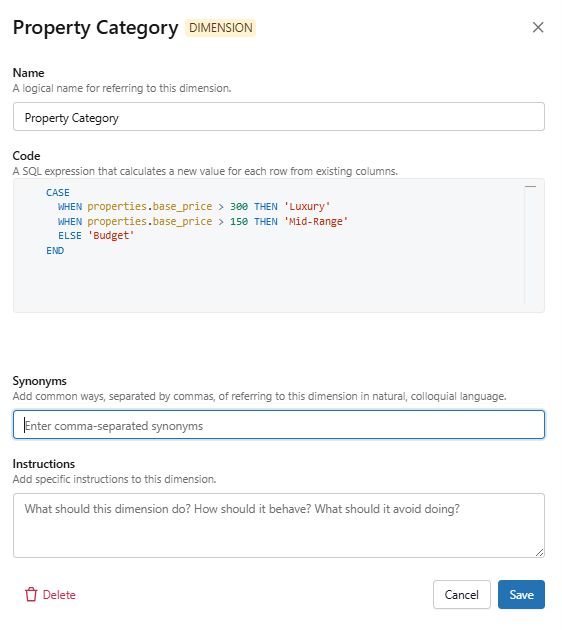
Question: ‘What are net bookings for luxury properties by FY and Quarter?
Genie response:
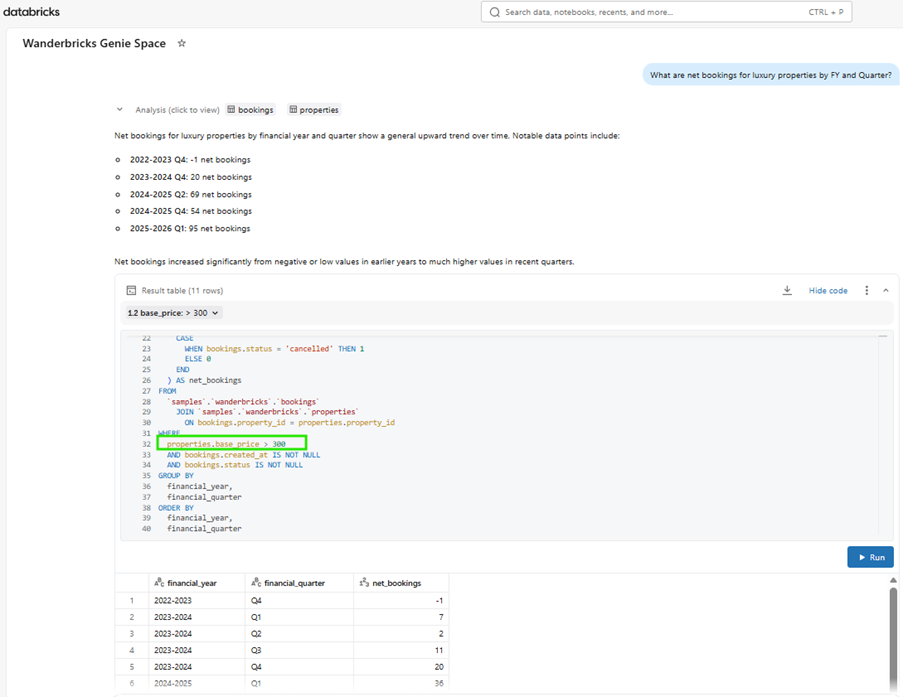
Successful Genie space implementation depends on capturing business logic early. Documenting fiscal calendars, specific measure filters, and dimensions ensures that SQL expressions accurately reflect business requirements from the start.
Key discovery areas for a robust Genie configuration
- Temporal Logic & Fiscal Calendars – define the start and end of the fiscal year, specific quarter boundaries, and how the business handles “Year-to-Date” (YTD) versus “Fiscal Year to Date” (FYTD) calculations.
- Core Business Measures – standardise the formulas for key metrics (e.g., Gross Margin, Active Users, or Churn) to ensure SQL expressions remain consistent across different queries.
- Custom Dimensions & Hierarchies – identify non standard groupings, such as custom sales territories or product categories, that do not exist as native fields in the raw data.
- Synonyms & Shared Vocabulary – collect the various terms different departments use for the same data (e.g., “Client” vs. “Account” vs. “Subscriber”) to build a robust semantic layer.
- Exceptional Logic & Deviations – document any “rules of thumb” or exclusion, such as excluding internal test accounts or specific legacy region, that deviate from standard data assumptions.
- Default Filtering – establish baseline filters that users expect to be applied automatically, such as filtering out deleted records or focusing only on “Live” status entries.
Databricks Genie combined with SQL Expressions enables organisations to deliver governed, business-aware conversational analytics. By embedding core measures, filters, and dimensions directly into the Genie knowledge store, organisations can ensure that AI-generated SQL reflects real business definitions. When implemented correctly, Databricks Genie becomes a reliable natural language interface for enterprise data.