Lakeflow Connect


Lakeflow Connect
With the increasing growth of data coming through various data sources, organisations are constantly searching for data engineering solutions that could handle the volume and complexity of data.
The Complexities of Data Engineering
Data engineering encompasses the complex processes of gathering, organising, and maintaining data to ensure it is accurate, dependable, and suitable for analysis. Yet, this work comes with significant hurdles:
1. Varied Data Sources: Organisations must often pull data from numerous systems, each using different formats and access protocols. This requires building and supporting custom integrations for diverse databases and enterprise tools.
2. Handling Batch and Streaming Data: Supporting both scheduled (batch) and real-time (streaming) data flows involves sophisticated logic for timing and incremental updates. Any delays or breakdowns in these pipelines can seriously impact business functions.
3. Pipeline Deployment and Oversight: Rolling out scalable data workflows using CI/CD pipelines, along with tracking data quality and provenance, usually calls for specialised tools and skills, making the entire process more complex.
What is Databricks Lakeflow?
Databricks Lakeflow is a transformative data management platform that addresses these complexities. It is designed to streamline data integration, processing, and management. Traditional data management systems struggle with modern data complexities, while Lakeflow offers a cohesive architecture for seamless integration and control. Lakeflow provides a centralised data platform for engineering, science, and analytics, enabling real-time insights and optimised workflows. It is a new unified solution for data engineering across ingestion, transformation and orchestration.
What is Lakeflow Connect?
Lakeflow Connect is a series of native ingestion connectors that are really intended for any data practitioner to be able to build incremental data pipelines at scale. It includes connectors for SAS applications, for databases, and for file sources. Lakeflow Connect is governed by Unity Catalog, it is orchestrated in workflows, and it is powered by serverless compute and Delta Live Tables.
Types Of Connectors
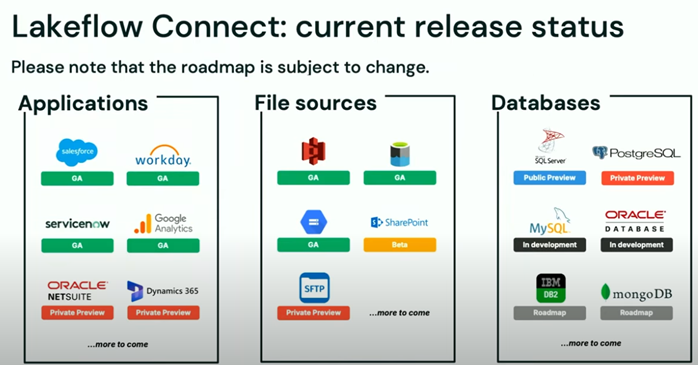
a) Fully Managed (Enterprise) Connectors
These are the most automated and easiest to use. They include authentication, change-data capture (CDC), schema evolution, retries, and more. All integration can be orchestrated through the UI, APIs, SDKs, or Asset Bundles. Supported connectors include:
- Salesforce – Generally available for end-to-end ingestion
- Workday – Generally available; supports ingesting Workday reports
- SQL Server (including Azure SQL Database and AWS RDS) – Public preview with CDC support
- ServiceNow – Public preview for enterprise IT/data use cases
- Google Analytics 4 (GA4) – Public preview, supports event-level ingestion
- SharePoint (files/unstructured) – Beta/preview stage, integrates with AI tools
b) Standard & Streaming Connectors (Custom/In-house)
When we need more flexibility or source is not supported by managed connectors, Lakeflow provides:
- Cloud object storage ingestion (e.g. Auto Loader for S3, ADLS, GCS)
- Streaming sources (e.g. Apache Kafka, Amazon Kinesis, Google Pub/Sub, Apache Pulsar)
- Local file uploads (CSV, JSON, XML, Parquet)
- DIY ingestion using Structured Streaming or Lakeflow Declarative Pipelines
- Third-party integrations via validated partner tools like Airbyte, Fivetran, Debezium, Informatica, Qlik
Database Connector Architecture
A database connector consists of several key components:
- Connection: A Unity Catalog entity that holds the authentication credentials required to access the database.
- Ingestion Gateway: Uses a DLT pipeline with classic compute to pull data from the source database.
- Staging Storage: A Unity Catalog volume that temporarily stores the extracted data before it is loaded into a Delta table.
- Ingestion Pipeline: A serverless DLT pipeline responsible for transferring the staged data into the target Delta tables.
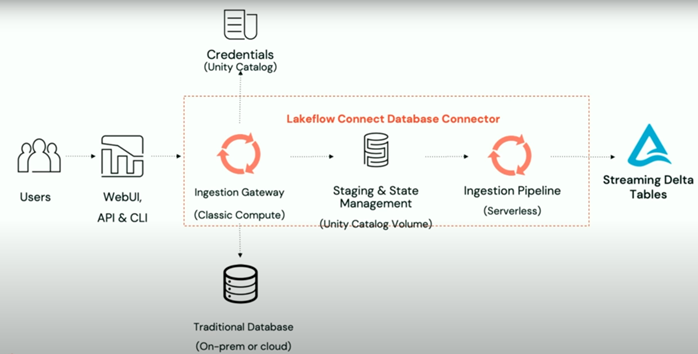
This pipeline runs on Serverless Compute and can be scheduled to run with any custom schedule we want. The destination tables where the ingestion pipeline is writing the data are streaming tables, which are delta tables with extra support for incremental data processing.
How to store credentials in Unity Catalog?
Storing secret information like login passwords and connection strings in Unity Catalog requires the user to take those steps:
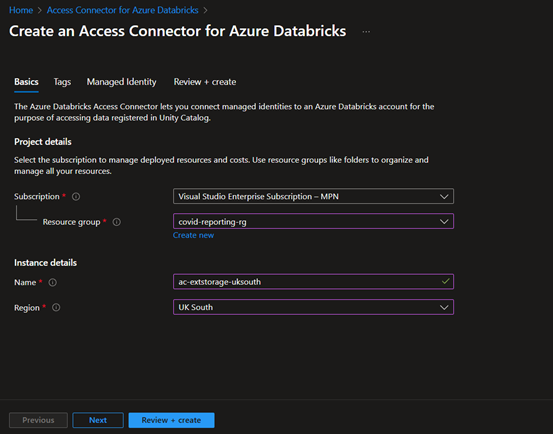
- Create Access Connector for Azure Databricks.
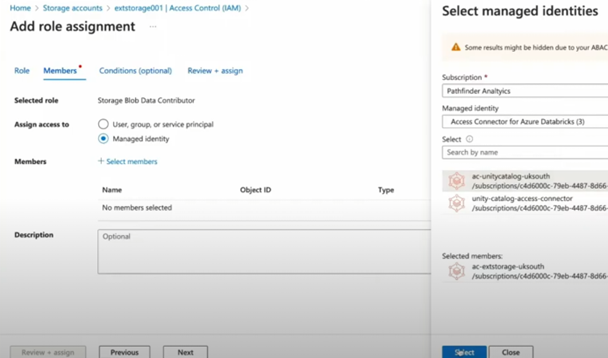
- Grant Storage Blob Data Contributor to Access Connector for Azure Databricks on ADLS Gen2 Storage Account.
- Create Storage Credential and External Location.
Before undertaking the steps above, let’s first define those two terms: storage credential and external location. Storage Credential is an authentication and authorisation mechanism for accessing data stored on our cloud tenant. External Location is an object that combines a cloud storage path with a storage credential that authorises access to the cloud storage path.
When creating the Access Connector, it is important to ensure the region is the same as the one for the Databricks workspace:
During the process of assigning the Storage Blob Data Contributor role, we need to make sure we select “Managed identity” and choose the correct access connector, in case we have more than one:
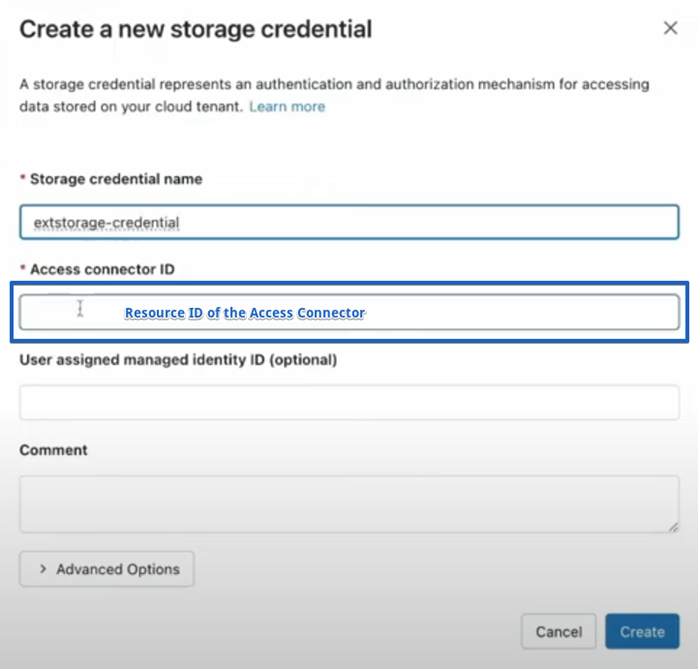
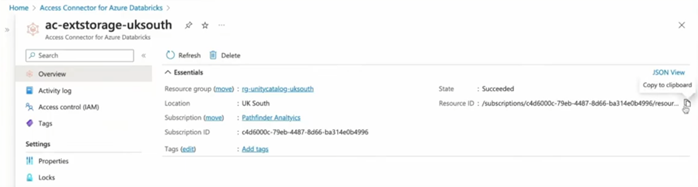
In Databricks go to “Catalog Explorer”. Then under External Data, click on “Storage Credentials” and then click on “Create credential”. We need to specify a unique storage credential name and then we need to copy and paste the Resource ID of the Access Connector:
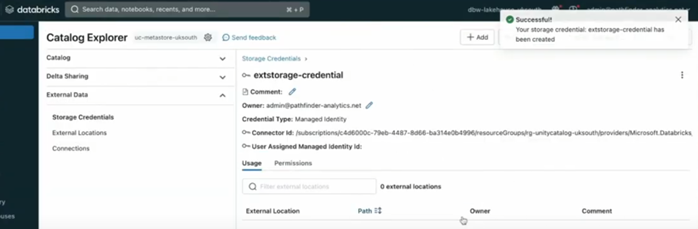
After clicking on the “Create” button, the storage credential should be created successfully:
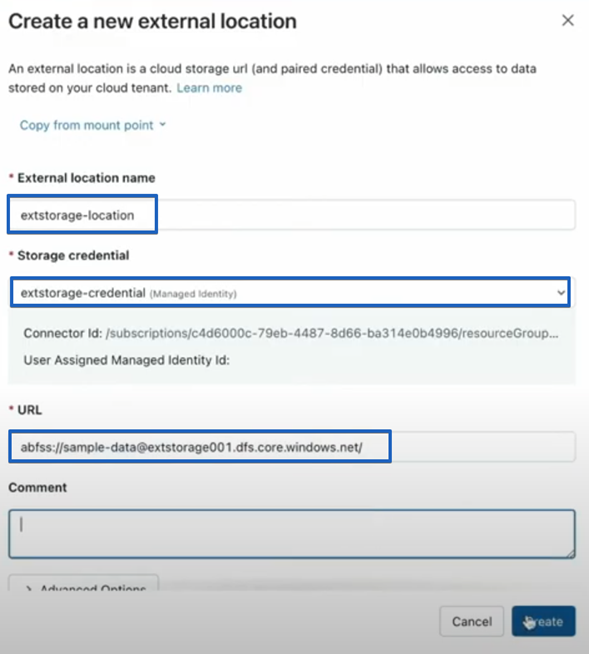
Now we are ready to create the external location. Similarly, under External Data, click on “External Locations” and then click on “Create location”. Then we need to define a unique location name, choose the storage credential we have just created and insert the URL of the storage account:
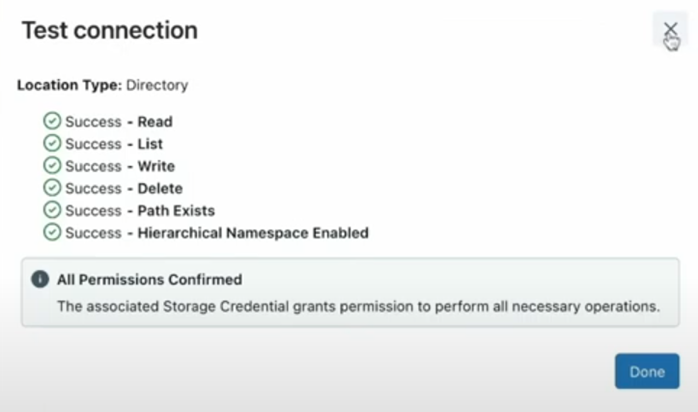
After creating the external location, we can test the connection, to validate it is successful:
How to set up Lakeflow Connect to Databricks?
1. Set up a connection.
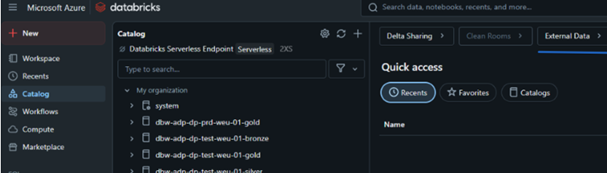
Click on “Catalog” and then click on “External Data”:
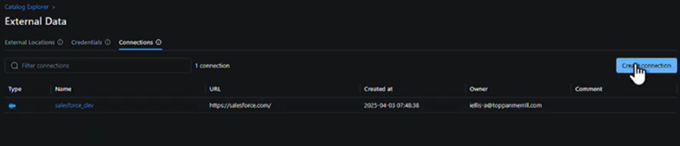
Review the current list of connections and create a new one:
Specify a unique connection name:
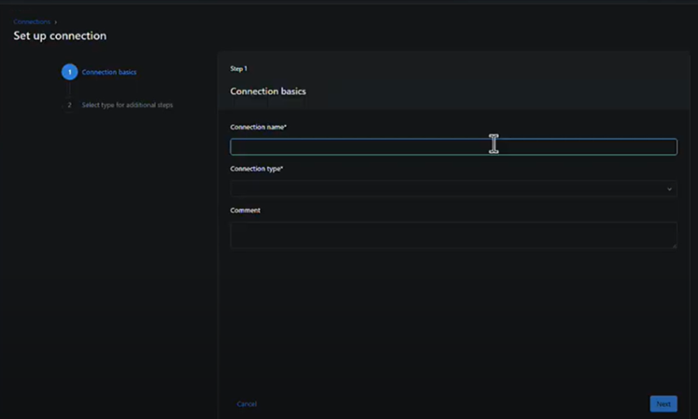
For connection type, we have a lot of different options:
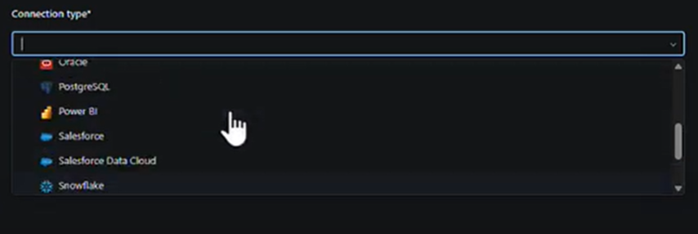
Let’s assume we choose Salesforce. Then we click on the button “Sign in with Salesforce”. Now here on this step, it would require both an API and interactive access. And then when we click on the blue button, it would use ideally a service account to get to Salesforce that has the credentials to all the different entities and objects. Then Databricks saves this connection information here when we build the connection.
2. Create a pipeline.
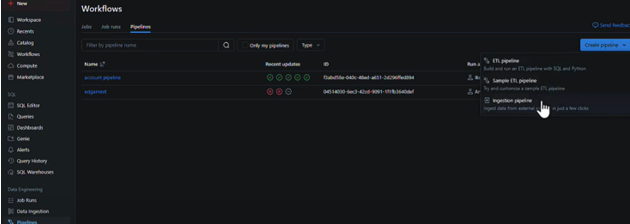
Go to pipelines and then click on the blue button “Create pipeline”. We can choose an Ingestion pipeline. Then we need to choose the respective Databricks connector.
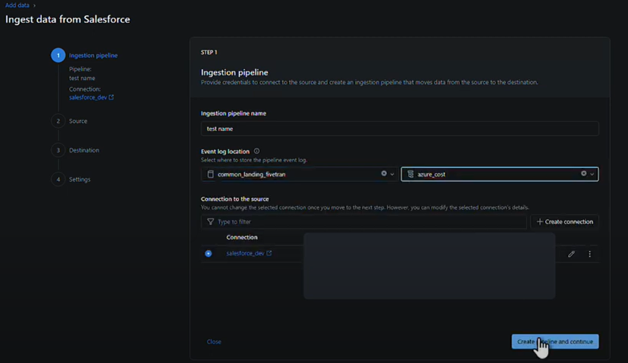
In the Ingestion pipeline tab, we need to specify the Ingestion pipeline name, the Event log location and our Connection to the source. Then we click on the “Create pipeline and continue” button.
3. Ingest data from source
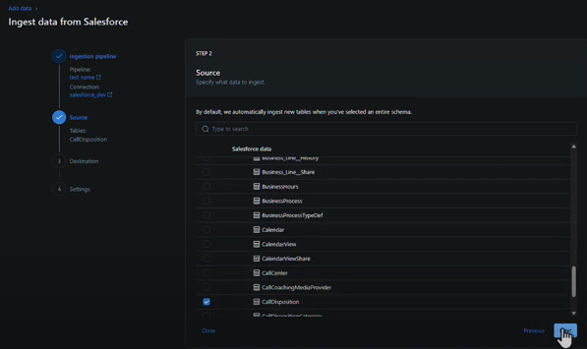
In the Source tab, we need to specify what data we want to ingest based on the list of Salesforce objects we have access to. Then we click on “Next”.
In the Destination tab, we need to choose the destination that would store the ingested data in Databricks. After clicking on “Save and continue”, the chosen destination cannot be changed.
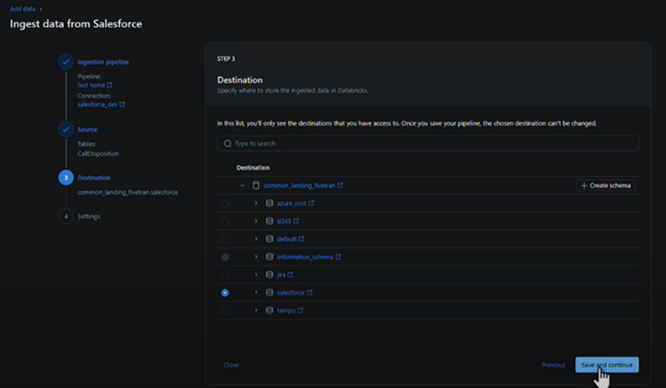
Now let us imagine that we have an Azure SQL Server source together with the Salesforce one and we have performed the same steps for it as well.
Lakeflow Canvas
We can see our ingestion pipelines on the unified Lakeflow canvas where we can click on the “+” icon on each of the pipelines and create a Transformation pipeline based on them:
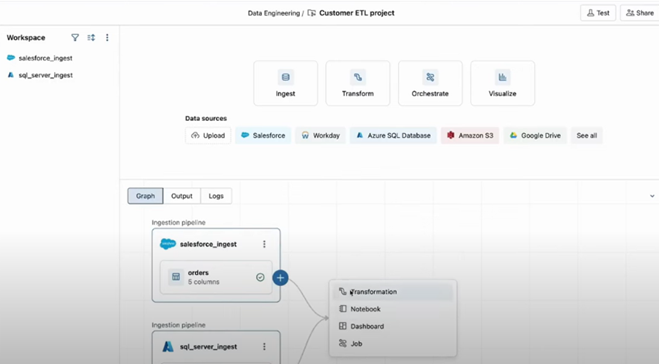
Since this is an intelligent application that has been built on the Databricks data intelligence platform, we can use the Databricks Assistant to help us with the joining condition for the two tables in the different sources.
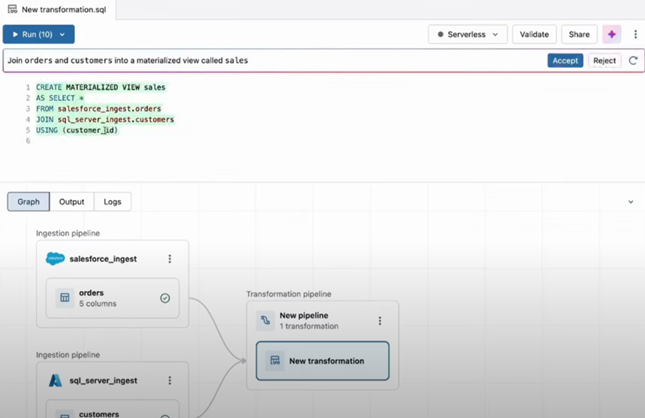
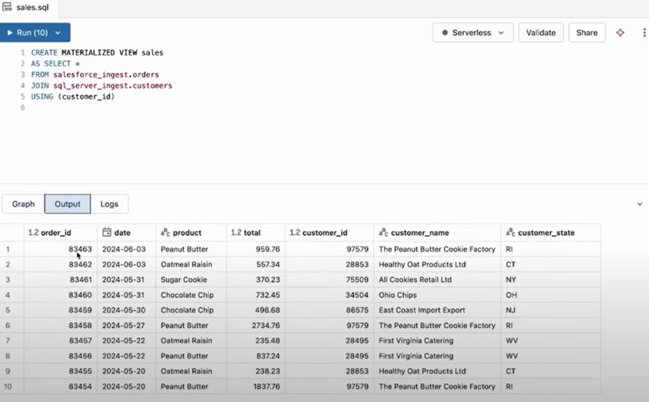
Then we could run the query suggested by the Databricks Assistant and we can immediately see the output.
Pipeline Runs
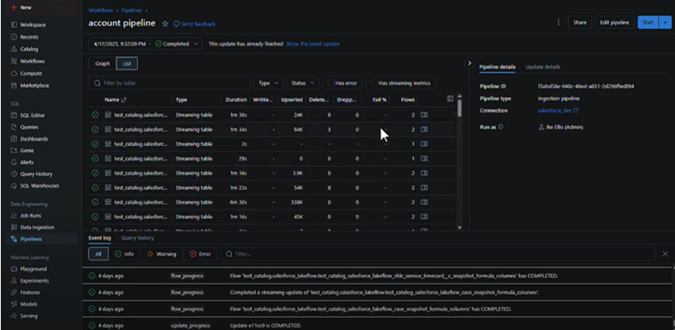
In the Pipelines tab, we can see details about each run of the respective pipeline – the duration to ingest the data from the source, the number of written, upserted, deleted and dropped rows.
Cost Implications
The costs for Lakeflow Connect are determined based on the Databricks Units (DBUs) used. DBUs are units of processing capability per second. They are used for measurement and pricing purposes. The number of DBUs a workload consumes is driven by processing metrics, which may include the compute resources used and the amount of data processed. With that regards, the costs vary depending on the region, type of workload and the cloud provider. Based on the different options in the Databricks pricing page, we could state that the cost variance is between $0.35/DBU and $0.52/DBU including the underlying compute costs. For example, if we choose Azure as a cloud provider and UK South as a region, the cost is $0.50/DBU.
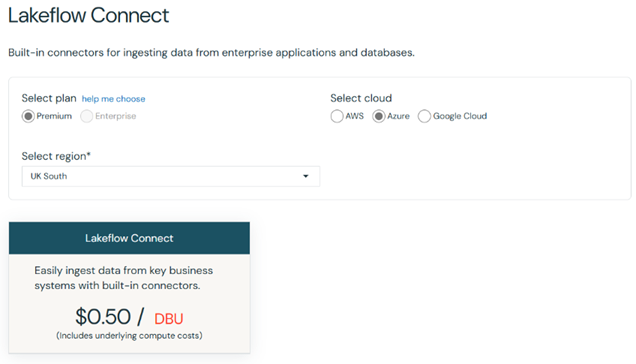
If we would like to view the different options, we can do this here: Lakeflow Connect | Databricks
Lakeflow Connect Ingestion
Lakeflow Connect maintains Salesforce connectors that directly pull data from Salesforce once we provide a Salesforce account. This is not something that has been supported in Data Factory. Here is the Lakeflow Connect standalone diagram that represents ingesting data from Salesforce:
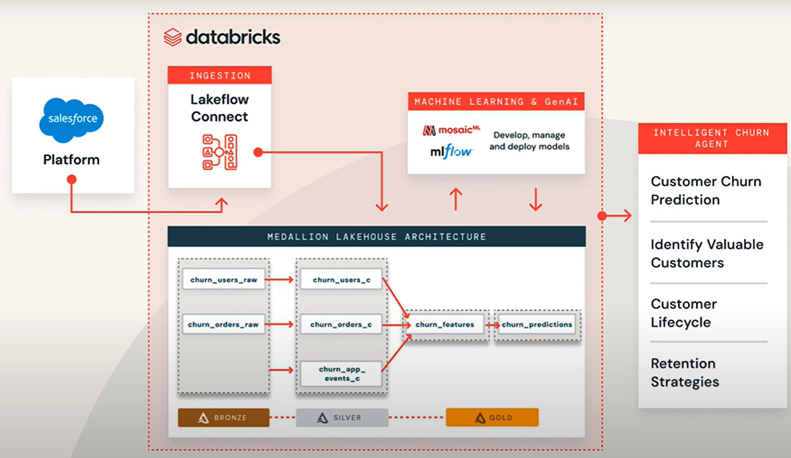
This diagram showcases how Lakeflow Connect, combined with a structured medallion architecture and ML tooling, enables businesses to automate and operationalise customer churn prediction. Data flows from Salesforce to actionable insights through a series of well-defined, orchestrated steps in the Databricks platform.
Conclusion
All in all, Lakeflow Connect provides a powerful and streamlined way to ingest data securely, without requiring any extra cloud infrastructure. It enables organisations to efficiently transfer data from SaaS applications or other databases into Databricks, supporting advanced analytics, machine learning, and business intelligence on a single, unified platform.