
Power BI Update September 2025


Power BI Update September 2025
September has seen FabCon in Vienna and Microsoft released latest Power BI update on the 17 September, the full details can be found on the Power BI blog. Here are a few things that caught my eye.
DAX User Defined Functions
This is a great new preview feature that allows reusable snippets of DAX code to be created and then reused in multiple other measures. This will avoid the need to copy and paste between measures and it will also make the DAX much easier to maintain as you will now only need to update the function rather than multiple measures.
You can create the functions in the DAX view. This one is a simple one to add VAT (UK sales tax)
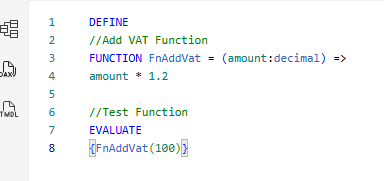
I can then use this function in any measures

Here it now applies the function to the Total Sales measure.
I expect all sorts of patterns to be shared by the community over the next few months, the people at SQL have set up a site called https://daxlib.org/ to contain some shared patterns for non-model specific functions e.g. to change format strings.
This feature has loads of potential and gives the ability to easily reuse code, it is definitely something I would recommend exploring.
Enhanced Time Intelligence
There is a preview of Calendar-based time intelligence a new feature that will require additional set up but more flexibility to handle different calendar scenarios and better performance. Its ability to handle Retail (445, 454, 544 patterns) or 13-month patterns will be interesting to look at as they can often be difficult scenarios to mange.
This looks interesting and is a feature I’ll be keeping a close eye on to see how it develops.
Changes for Admins to consider
Items to consider if you are a tenant admin or responsible for Power BI in your organisation.
Bing Maps

The Bing Maps Visual icon is being removed from the default visuals list in October prior to the visual being retired. You will start to get a warning you will get a warning if you use it in the desktop, but not in the service.

You will need to think about what visuals you want to use for mapping in the future and if you have used this visual in the past think about updating it. If you want to use the Azure Maps visual and are in the UK you will need to enable it and the setting to allow it to be processed outside your geographic region (The mapping data is processed within the European geographic area).
If you want to discuss mapping options and geodata strategies, please contact us.
Translytical Task Flows is on by default
These are now enabled by default in Power BI, these utilise user data functions you may want to disable this feature or limit to a security group while you are testing it if you are using Fabric.
Standalone Copilot is on by default.
This is the full copilot chat interface for Power BI and is now on by default. Depending on how you are rolling out Power BI in your organisation you may want to disable or limit to a security group.

Editing semantic models in the Power BI Service
This feature has become generally available and can be switched off in the tenant settings. You need to consider this in conjunction with your source control strategy as you do not want the definitive version of the production model to be different in the web and the desktop files.