
Choosing Between SQL and Python in Lakeflow Declarative Pipelines


Introduction
Lakeflow Declarative Pipelines (LDP) is a framework that allows you to build batch and streaming data pipelines using SQL and Python. It lets you define what you want, not how to do it. Databricks decides on the execution plan, managing of dependencies, partitions, checkpointing and retries. LDP accelerates pipeline development by providing built-in data quality, reliability and optimisation among other features. As a data engineer you can concentrate on delivering reliable data rather than managing infrastructure.
In LDP, source code is stored in separate files. These can be either Python or SQL files and each language can be used to implement pipeline logic. Both languages will provide equivalent functionality for most use cases. In fact you can use a mix of Python and SQL source files in the same pipeline, but each source file can only contain one language.
In this post, we will explore scenarios where one language might be more suitable than the other.
SQL vs Python
Databricks recommends using the language you are familiar with for most uses cases, but it should not be the only factor. Complexity of the task should also be considered.
If you are coming from a SQL background using SQL would be a good choice. SQL is more readable and it has clear syntax that most of analysts and data engineers will be familiar with. On the other hand Python offers more flexibility, you can make use of full PySpark API and Python libraries to implement custom logic and functions. It also supports building modular and reusable components.
For basic transformations both SQL and Python offer equivalent functionality. You can create the same datasets using either with the same equivalent config in each.
Databricks offers comprehensive documentation for SQL and Python syntax in LDP. Please check SQL language reference and Python language reference. Personally I prefer to use SQL whenever possible, as it’s a powerful declarative language that is well suited for querying data. Python being imperative, can feel more difficult to code especially for basic tasks.
SQL and Python
As mentioned earlier Databricks allows mixing SQL and Python files in a single pipeline. This hybrid approach can work well as it allows the use of SQL scripts for simple transformations and Python for anything requiring more complex logic.
Use cases
Most basic use cases can be implemented using either SQL or Python. It really is down to personal preference. Both provide equal functionality when creating datasets in LDP. This is especially true when we are dealing with structured data. However, anything requiring more complex transformation might be better dealt with in Python.
For example, if we want to create tables dynamically or using metadata, this will be best handled in Python due to its flexibility and use of external libraries. Databricks offer good examples of dynamic table creation in here. If we want to implement re-usable, unit tested code this also will be best handled in Python. There are many uses cases where logic in SQL might be just overcomplicated, for these Python should be the language of choice.
Let’s look at an example of loading and processing data from nested JSON. This file represents the hierarchy of the departments within a company. It’s a typical hierarchy, with varying levels depending on the department.
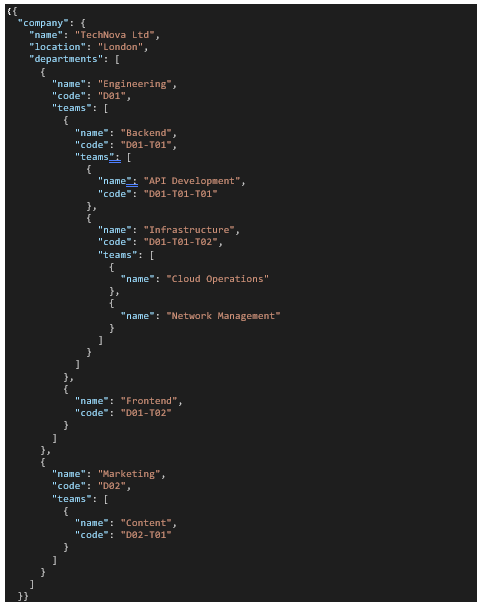
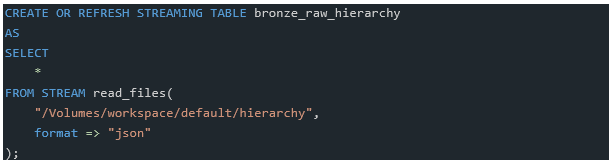
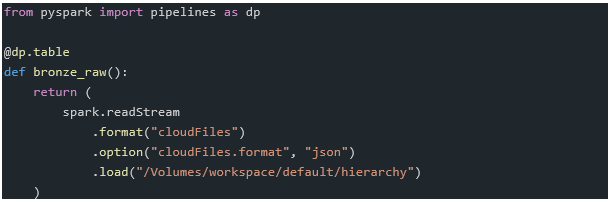
Ingesting this data into bronze layer is straight forward. Using autoloader we can easily do this in SQL or Python
SQL:
Python:
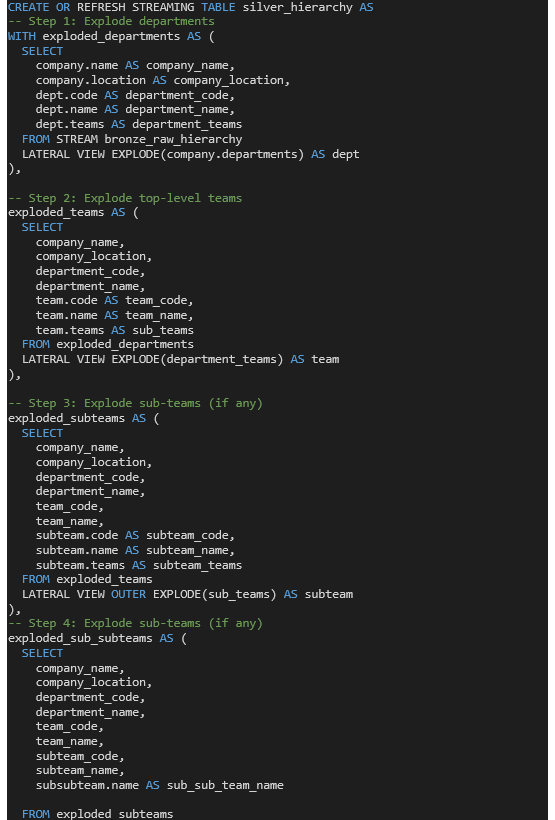
Next step is to process this data. To traverse a hierarchy is not as easy in SQL. In fact, I didn’t find a way to do it without setting a fixed depth of nesting. The SQL solution provided below is not flexible enough due to the limitation of SQL for handling recursive data. Recursive Common Table Expression (CTE) are available in DatabricksSQL but not yet available in Lakeflow Declarative pipelines. Until they are, SQL is not only more complex and less intuitive but also less flexible for this use case, especially compared to Python.
SQL:

Python:
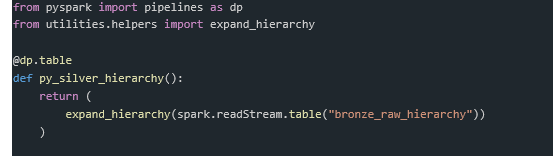
Python lets you hide all logic in the function expand_hierarchy, which makes code look clear and uncomplicated.
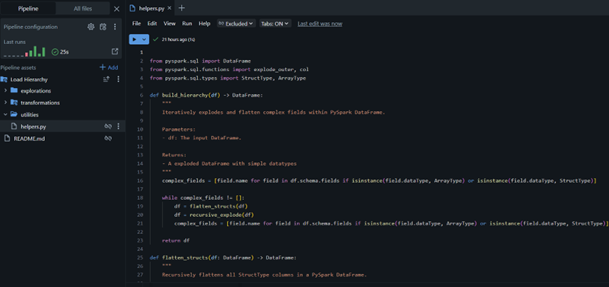
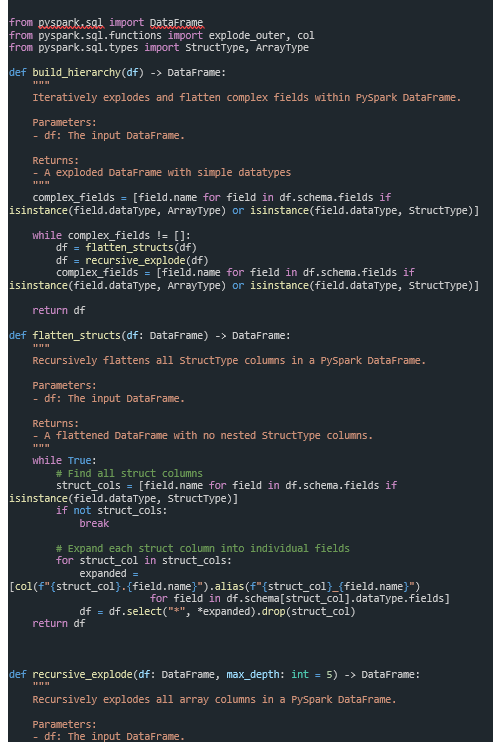
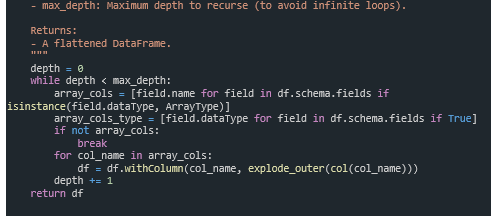
With having logic implemented separately, we can ensure the function can not only be unit tested but also re-usable within other pipelines. You can store supporting code within the pipeline, as shown below, but LDP also allows you to use functions stored in Databricks Git folders or in workspace files.
Summary
For standard queries or minimal transformations SQL is a better choice. Python, with its extended functionality will cope better for use cases where advanced logic is required or if you are concerned with building modular, reusable, and testable code.
The strength of LDP lies in the support for both languages. Flexibility of using both is worth considering, and choosing what is right for each transformation step will create code which is simpler to manage and maintain.
Ultimately, deciding whether to go with Python or SQL is largely dependent on what your task is and your preference.
Link to Databricks docs:
– Develop pipeline code with SQL | Databricks on AWS
– Develop pipeline code with Python | Databricks on AWS