
Microsoft Licensing Insights: Are You Overpaying for Microsoft 365?


Microsoft 365 is now an essential part of the IT environment for many organisations. But as businesses grow, change and adopt new Microsoft services, their licensing environment can quickly become difficult to manage.
Users change roles. New employees join. Others leave. Microsoft introduces new products and licensing options. And over time, organisations can end up paying for licences, features and services that aren’t being fully used.
The result? Microsoft 365 licensing costs can quietly increase without delivering additional value.
The good news is that there are several practical checks organisations can make to identify potential savings and ensure they’re getting the most from their Microsoft investment. From reviewing unused licenses and user requirements to billing models and renewals, this article looks at where unnecessary costs can creepy up and what steps organisations can take to get more from their Microsoft 365 investment.
Are all your licences actually being used?
The first place to start is surprisingly simple: look at what you are paying for. Organisations may have hundreds or thousands of Microsoft 365 licences assigned across their users, but assignment doesn’t necessarily mean utilisation. For example, a user may have an E5 licence because their role once required advanced security or compliance capabilities, even though their responsibilities have since changed.
Regularly reviewing licence assignments against actual user requirements can help identify:
- Unused or inactive licences
- Users who have left the organisation
- Users who no longer require their current licence
- Duplicate or overlapping licences
- Users assigned capabilities they don't need
Even a small amount of unused licensing can represent a significant annual cost at scale.
Are users on the right licence?
Not every employee needs the same Microsoft 365 licence. A common approach is to standardise on one licence across the organisation because it makes procurement and administration easier. While this can simplify things, it may also mean you’re paying for functionality that some users don’t require.
Consider an organisation with:
- Office-based knowledge workers
- Frontline workers
- Occasional users
- Contractors
- Shared-device users
- Users with specific security or compliance requirements
These users may have very different licensing requirements. Instead of asking “Which Microsoft 365 licence should we give everyone?”, organisations should consider asking:
“What does each user actually need to do their job?”
This can help create a more efficient licensing model without compromising productivity or security.
Are you paying for features you aren't using?
Microsoft 365 plans can include a significant number of capabilities beyond the applications users rely on every day. For example, organisations may be paying for advanced security, compliance, analytics or collaboration functionality that isn’t being used to its full potential. This doesn’t necessarily mean those capabilities aren’t valuable. It means organisations should understand what they’re paying for and whether those capabilities are required.
A useful licensing review should therefore consider both: what are we paying for and what value are we getting from it?
The answer isn’t always to move users to a cheaper licence. In some cases, the better outcome may be to make better use of functionality that the organisation is already paying for.
Are you reviewing your licences when people change roles?
Licensing often gets overlooked when employees change roles. Someone might start in a role requiring a particular licence and then move into another position with different requirements. Their original licence, however, may remain assigned indefinitely. The same applies when employees leave the organisation. A mature Microsoft 365 licensing process should reflect changes in the workforce.
This could include reviewing licences as part of:
- Joiner, mover and leaver processes
- Role changes
- Department transfers
- Contractor onboarding and offboarding
- Organisational restructures
Licensing optimisation isn’t necessarily a once-a-year exercise. It should form part of ongoing IT operations.
Are you choosing the right commitment and billing model?
The licence itself isn’t the only commercial consideration. Microsoft 365 subscriptions can have different commitment and billing options, and the right approach depends on how predictable your requirements are. For example, an organisation with a stable user base may have different needs from one experiencing rapid growth, seasonal demand or regular workforce changes.
It’s therefore worth reviewing:
- Annual versus monthly commitments
- User growth and reduction patterns
- Licence requirements over the next 12 months
- Renewal dates
- Microsoft's current commercial terms
- Whether your current purchasing model still fits your business
The cheapest licence isn’t necessarily the cheapest overall solution if it creates inflexibility or doesn’t match the way your organisation operates.
Could you benefit from a different Microsoft licensing model?
It’s also worth considering how you buy Microsoft licences, not just what you buy. For many organisations, Microsoft Cloud Solution Provider (CSP) programme offers an alternative to purchasing Microsoft services through other commercial arrangements. CSP can provide options around subscription management, billing, licence changes and partner support, depending on the agreement and services selected. For organisations currently using an Enterprise Agreement or another purchasing model, it can be worth reviewing whether their existing arrangement remains appropriate as their Microsoft estate evolves. This is particularly relevant when approaching a renewal or when there have been significant changes to the organisation’s Microsoft footprint.
Are you reviewing your Microsoft licensing after major changes?
Microsoft licensing isn’t static. New products are introduced, existing products change, prices are updated and licensing terms evolve. For example, developments across Microsoft 365, Copilot, security, Teams and other cloud services can change the way organisations approach their licensing strategy. A licensing model that was appropriate two or three years ago may no longer be the most suitable approach today.
That’s why organisations should consider a licensing review following major events such as:
- Microsoft pricing changes
- New product launches
- Major changes to licensing terms
- Mergers or acquisitions
- Significant workforce changes
- Migration to new Microsoft services
- Contract or subscription renewals
Don't just look for savings. Look for value.
Microsoft licensing optimisation shouldn’t simply be about reducing the number on the invoice. The objective should be to make sure your organisation is paying for the right capabilities, for the right users, in the right way. Reducing licences that aren’t being used is an obvious saving. But there can also be value in identifying users who need additional capabilities, standardising where appropriate, or making better use of functionality you’re already paying for.
A good licensing review should therefore consider three questions:
- What are we paying for? Understand your current Microsoft estate and commercial commitments.
- What are we actually using? Compare licence assignments with user requirements and utilisation.
- What do we actually need? Align your Microsoft licensing with your current and future business requirements.
A simple Microsoft 365 licensing health check
If you’re reviewing your Microsoft 365 environment, start with these five questions:
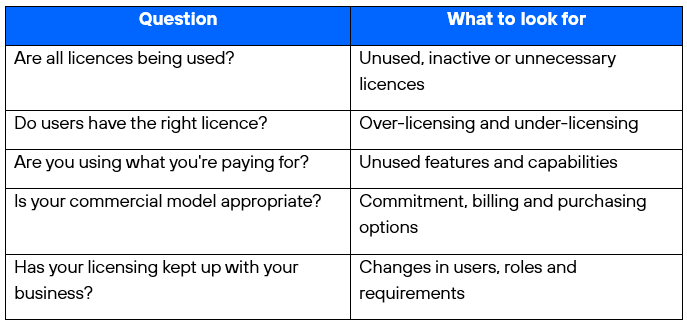
If the answer to any of these questions is “I’m not sure”, it could be time for a licensing review.
Making Microsoft 365 work harder for your budget
Microsoft 365 licensing can become complex, particularly as organisations adopt more services and Microsoft’s portfolio continues to evolve.
The answer isn’t necessarily to reduce licences or move everyone onto a cheaper plan. The real opportunity is to understand your environment, identify where licensing isn’t aligned with requirements and make informed decisions about your future Microsoft investment.
A regular licensing review can help organisations reduce unnecessary spend, improve licence utilisation and ensure their Microsoft 365 estate continues to support the way their people work.
At Telefónica Tech, we help organisations understand their Microsoft licensing position and identify opportunities to optimise their Microsoft investment.
Want to understand whether your Microsoft 365 environment is costing more than it needs to? Talk to our Microsoft licensing specialists about a licensing review→